
NTP module
The NTP module processes Network Time Protocol (NTP) traffic. It stores the NTP servers, including their clients, and further NTP related information. The following documentation is based on the RFCs, mainly RFC 1305.
NTP statistics
Section titled “NTP statistics”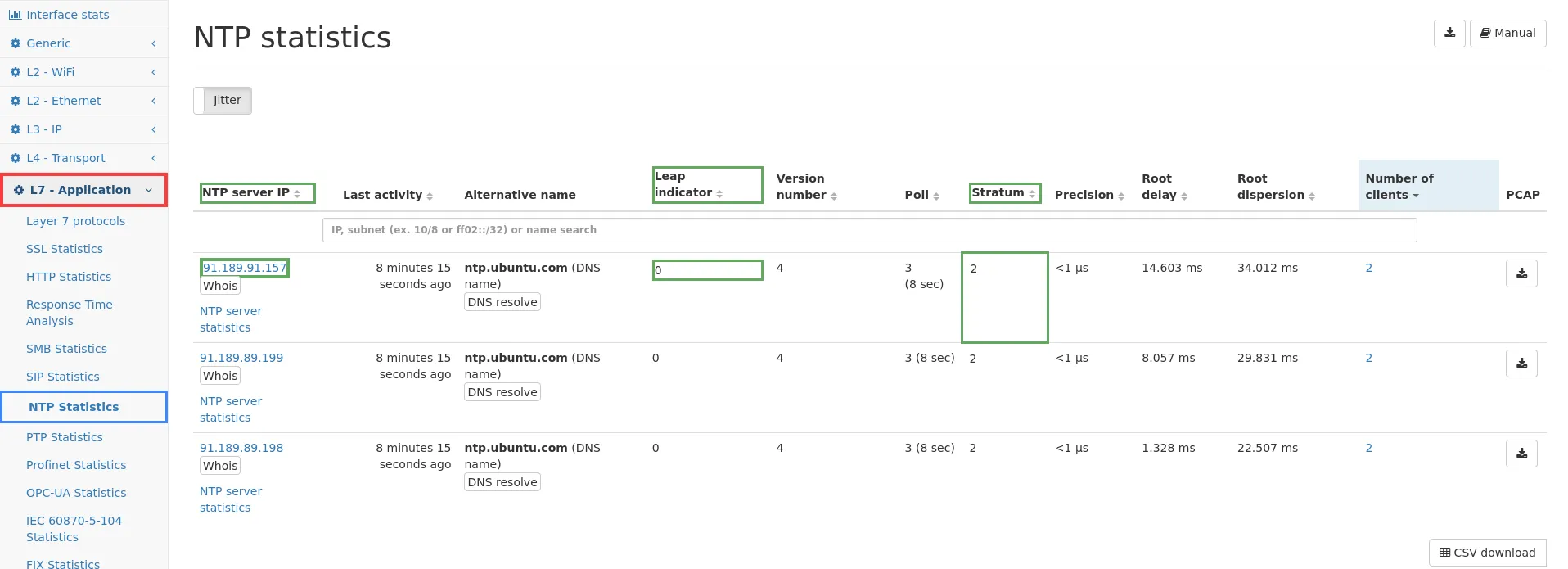
The NTP statistics page shows a table listing all seen NTP servers and their statistics. The table and the server details page contain the following information:
-
NTP server IP: This is the IP of a seen NTP server (see Common table columns - IP). This status is assigned when this IP has sent a NTP packet with mode 4. Therefore every clock that is configured as a reference clock will be stored as a server.
-
Alternative name: This column shows all known name information about the server IP.
-
Leap indicator: Indicates if a leap second will be inserted respectively removed this day. Possible values are:
- 0: No second will be removed/inserted.
- 1: A leap second will be inserted.
- 2: A leap second will be removed.
- 3: Clock is in an unsynchronized state (warning).
-
Version number: The currently used version number. Recent version is NTPv4.
-
Poll: The minimum interval in seconds between transmitted messages. It is specified in log2.
-
Stratum: The stratum is the hierarchy level of the NTP server and represents the distance from the reference clock. Possible values are:
- 0: Unspecified.
- 1: Primary reference (e.g. an atom clock).
- 2-15: One plus the stratum of the reference clock.
- 16: Indicates an unsynchronized state.
-
Precision: The precision of the reference time clock, more precise: A precision value 25ms indicates that the reference clock is able to maintain this precision.
-
Root delay: This number indicates the total roundtrip delay to the primary reference source at the root of this subnet.
-
Root dispersion: This is the maximum error relative to the primary reference source at the root of this subnet.
-
Peer dispersion: This is the maximum error of the peer clock relative to the local clock over the network path between them.
-
Last origin timestamp: Time at the client when the request was sent to the server.
-
Last receive timestamp: Time at the server when the client request arrived.
-
Last reference timestamp: Time when the system clock was last set.
-
Last transmit timestamp: Time at the server when the response was sent to the client.
-
Number of clients: The number of NTP users that use this clock as a reference.
-
Jitter: The jitter is defined as the root-mean-square (RMS) average of the most recent offset differences, and it represents the nominal error in estimating the offset. Jitter is a quantity calculated for each server/client pair. The min/med/max values are the minimum/median/maximum jitter of all the clients that have connected to the server.
Remark for chrony users
Section titled “Remark for chrony users”Chrony sets the reference timestamp to zero and the received/transmit timestamp to a random value. Only the origin timestamp is correct. This also causes the jitter calculation to become invalid since the exact timestamps are needed.
Rows without values
Section titled “Rows without values”It can happen that rows have no values respectively show only - for most values. This indicates that this server/client has received a NTP packet but didn’t send a response to the client/server. That means that this server/client is recorded as a NTP member, but there is no further information about it, because it never sent a NTP packet.