
Web Speedtest
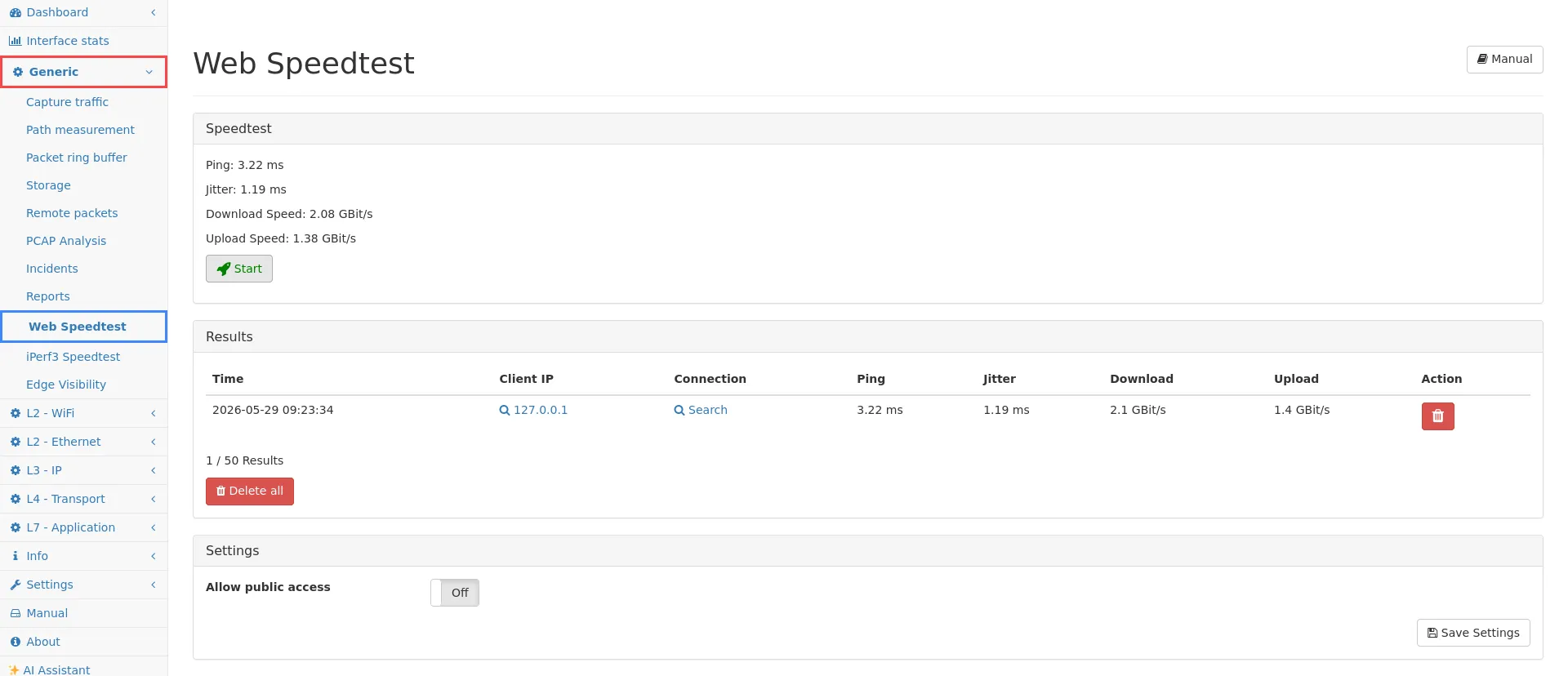
The Web Speedtest can be used to measure the network speed between the management interface of the Multimeter and the user’s browser.
Results
Section titled “Results”The results are displayed in the results table. Up to 50 speedtest results can be stored.
Clicking on the Client IP address will redirect you to the page of this client address in the IP module if this address has been captured in the selected Virtual Link Group.
To find the connections from a speedtest, click Search and you will be redirected to the connection details page if the speedtest traffic has been captured in the selected Virtual Link Group.
Settings
Section titled “Settings”If Allow public access is activated, the speed test can be used without user login.
Public access to the speed test can be found at the address https://[IP/DEVICE NAME]/speedtest.
Limitations
Section titled “Limitations”This web speedtest uses an HTTPS connection for the bandwidth measurement. It is designed to measure bandwidths up to 1 GBit/s. If you need a higher speed or accuracy, you can use IPerf3. It is not possible to run several speedtests at the same time.
Note that the traffic of the management interface will not be captured by the measurement interfaces. If you want to see the web speedtest traffic in the IP module, make sure that the client IP or the multimeter management traffic is captured by the measurement interfaces.