
TLS module
The TLS module processes encrypted Secure Socket Layer (SSL)/Transport Layer Security (TLS)/Datagram Transport Layer Security (DTLS) traffic and stores the visible names of the TLS server internally for cross-referencing, so that name lookup is possible for an IP even if no DNS name has been seen for it. Since a server may handle multiple instances of encrypted services, multiple names can be seen as well for an IP. The TLS module stores all names for each IP, which helps seeing which servers in the network handle which specific service. Also, the response times of the server for the initial TLS handshake and the first data transmission are measured as well to quantify the quality of the TLS connections. The available informations are:
- (D)TLS server name: This identifier is set by the client of a connection to indicate which specific service the user wants to connect to. This is similar to the Host header of an HTTP request, when a server handles multiple virtual hosts.
- (D)TLS common name: This is the identifier set in the (D)TLS certificate returned by the server. This indicates for which domains the server is responsible for. It may be identical to the requested (D)TLS server name, but often it is a wildcard for any subdomain of the given host. For example, the requested server name may be maps.google.com while the common name of the returned certificate may be *.google.com.
- (D)TLS handshake response time: The time between the (D)TLS client hello and the (D)TLS server hello is measured for statistical analysis.
- (D)TLS data response time: The time between the first (D)TLS client data and the (D)TLS server data is measured for statistical analysis.
TLS Statistics
Section titled “TLS Statistics”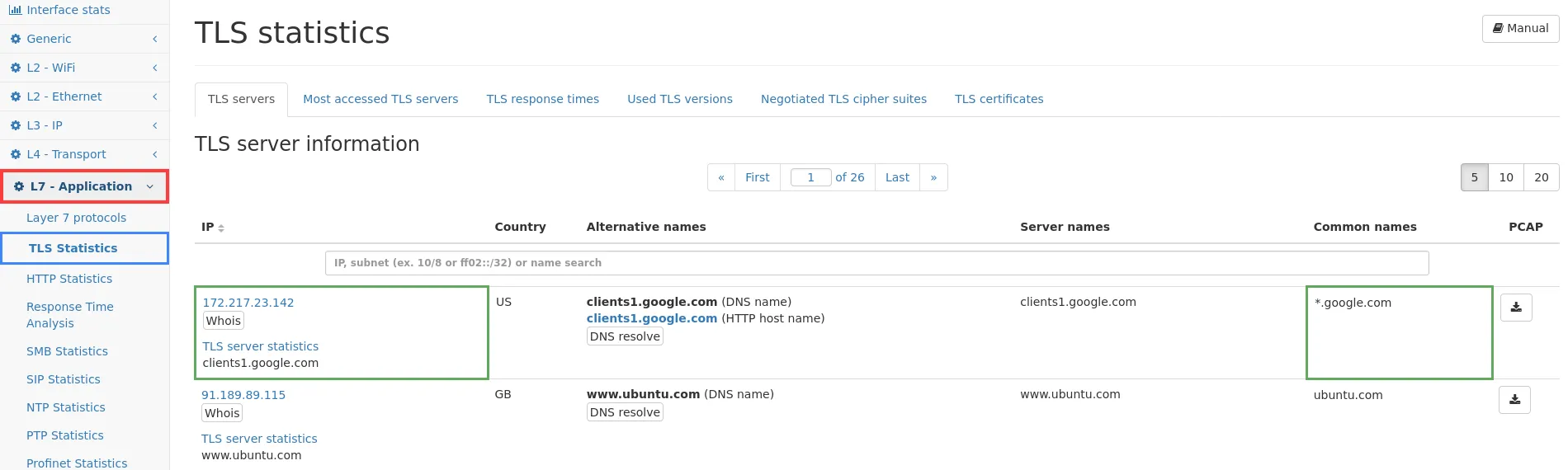
The web page of the TLS module uses three tabs for showing all available information. At the top of the page, you will find a button which links to this documentation.
TLS servers
Section titled “TLS servers”The first tab TLS servers shows a list of all IP addresses for which (D)TLS information could be retrieved. The table of IP addresses contains a search bar where you can enter an IP address or string which is matched against all name fields. This makes it possible to search for a specific IP or to find all IP addresses involved for a given certificate name. The columns are as follows:
- IP (see Common table columns - IP): This is the IP address for which (D)TLS information has been seen. Clicking on TLS server statistics will lead to the IP module page of the same IP address.
- Country: The country code for the corresponding IP.
- Alternative names: All known names for that IP address are shown in the column. This includes the DNS name and DHCP name, if available.
- Server names: As described above, these are the names requested by the client. Since an IP may host multiple services, all seen names are listed here.
- Common names: Similar to the server names, the common names of all seen certificates are listed here, which have been returned by the server.
- PCAP: The capture button allows to directly capture traffic for the corresponding IP address.
Most accessed TLS servers
Section titled “Most accessed TLS servers”The second tab shows the top list of all accessed (D)TLS servers, showing the most accessed server first. The list contains the number of requests, the IP (with a link to main server list filtered for that IP; see Common table columns - IP), the country of that IP, and alternative names known for this IP.
TLS response times
Section titled “TLS response times”The third tab shows global statistics of all (D)TLS requests and a list of all (D)TLS servers for which response times could be calculated.
The global statistics contain for the (D)TLS handshake and first (D)TLS data transmission:
- Number of handshakes/data responses: This is the total number of requests/responses that have been seen on the network.
- Average response time: This is the average response time in milliseconds for all servers.
- Standard deviation: This value shows the variation of the response times (en.wikipedia.org/wiki/Standard_deviation).
- Minimum response time: This is the smallest response time seen on the network.
- Maximum response time: This is the largest response time seen on the network.
Next to each table (handshake time and data time) there is a chart about the number of servers with high, normal or low response quality. The table is split to local servers (those within private networks) and global servers (all the rest). The green high quality section contains all servers with a quality score of 4 or more, the blue normal section covers all servers with a quality score between 3 and 4, and the orange low section covers all servers with a quality score of less than 3. The list of servers below can be sorted for the quality value to view the relevant servers from each category. Below the global statistics there are two graphs showing historical data for handshake and (D)TLS data responses. The data points are the average response time in the given time window (depending on the zoom level), and the top and bottom line shows the maximum and minimum response time in that time frame.
Below the graphs there is the list of all HTTP servers with the following columns:
- IP (see Common table columns - IP): The server IP and name. Clicking on TLS server statistics leads to the connection view of the IP module which allows to see the actual connections with the response times.
- Country: The country code for the IP address.
- Type: This column indicates both rows of data shown in the following columns. The first line is the (D)TLS handshake time, and the second column is the (D)TLS data response time.
- No of responses: The number of (D)TLS requests/responses seen for this IP address.
- Avg time: This is the average response time for this IP address.
- Deviation: This is the standard deviation for all response times of this IP address.
- Min time: The minimum response time in milliseconds.
- Max time: The maximum response time in milliseconds.
- Score: The score is a value between 1 and 5 describing the quality of the HTTP server. 1 means the worst quality, 5 means the best quality. The value is calculated based on a scoring algorithm. The score allows to quickly sort for quality and identify bad performing servers. For sorting, the smaller of both response times is used.
- Alternative names: The column contains other names for this IP address, from whatever name source that is available (DNS, DHCP, …).
Used TLS versions
Section titled “Used TLS versions”The version tab shows all (D)TLS versions that were negotiated in a (D)TLS server hello. For each TLS version the traffic is shown. By clicking a version a detail page is shown with a table of all IPs that used this TLS version and related traffic counters. Further clicking on Connections will show the IP connection detail page with all connections of that TLS version.
Negotiated TLS cipher suites
Section titled “Negotiated TLS cipher suites”This tab shows all server negotiated (D)TLS cipher suites in a table. Per cipher suite the name, number of (D)TLS server hellos (which contains the cipher suite negotiation) and a graph with server hellos over time are shown. By clicking on a cipher suite a detail page is shown with a table of all IPs that used this cipher suite in a (D)TLS connection either as server or client. A graph shows the server hellos having that IP as either source or destination over time. When clicking on an IP address the connection tab of that particular IP address is shown with a preset filter of (D)TLS connections with that cipher suite to allow further investigation.
TLS certificates
Section titled “TLS certificates”This tab shows a list of all the (D)TLS certificates that have been seen. It lists certificate information like the serial number, the common name for which the certificate was issued, the common name and organization of the issuer as well as the validity dates. The Connections link allows to jump to the global connections list with a filter applied that will only show connections which used this specific certificate.
The certificates table can be filtered by a full text search or by a complex filter expression. A complex filter expression that uses a comparison with the validity date for example can be used to identify certificates that will become invalid within a certain time.
Since DTLS is mostly identical to TLS the information inside DTLS handshakes integrates nicely with the TLS module, and all relevant information is displayed alongside the regular TLS information.
Additionally, the sequence and message numbers of DTLS packets and handshakes are analyzed to track transmission errors such as packet loss, out-of-order transmissions and retransmissions. These informations are tracked per connection and can be found in the IP Connection Details.