
DHCP module
The DHCP module tracks requests and answers for dynamic IP assignments in networks. This allows to resolve self-announced system names to actual IP addresses. Also, the module gives an overview about running DHCP servers in the network, allowing to identify problems with IP address assignments.
DHCP Statistics
Section titled “DHCP Statistics”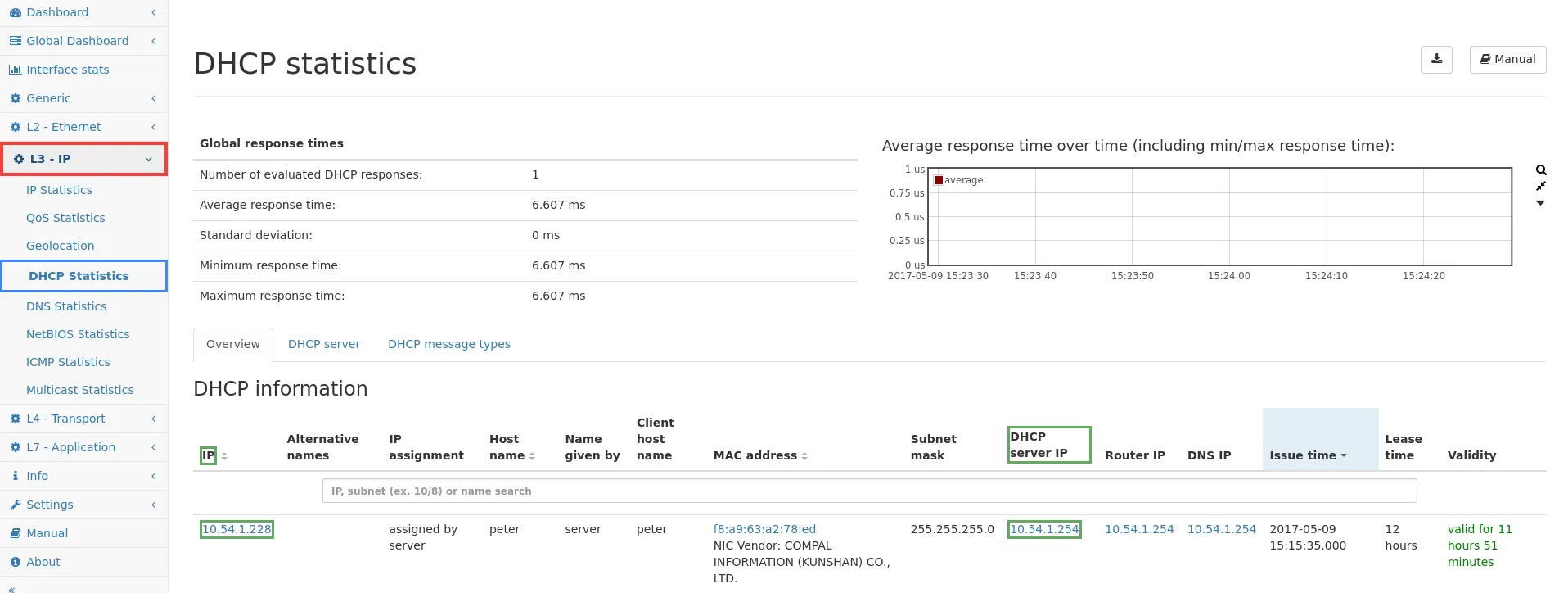
DHCP leases
Section titled “DHCP leases”The DHCP leases tab shows all IPs that have been assigned dynamically by any DHCP server seen on the network. The columns are as follows:
- IP: This is the IP address assigned to the client computer. Clicking on the address link will lead to the corresponding page of the IP module.
- Alternative names: Shows all known names from different sources for the IP address.
- Host name: During the DHCP request, the client may tell its own host name. This columns shows this value. Depending on the network configuration, this name might be used for DNS name look-up as well.
- MAC address: This is the address of the network device from the client computer. Clicking on the address link will lead to the corresponding page of the MAC module. The vendor name who owns the MAC address is also shown as well as custom defined names.
- Subnet mask: This is the netmask corresponding to the assigned IP address.
- DHCP server IP: This is the IP address of the server which assigned the dynamic IP address to the client.
- Router IP: The DHCP server will tell the client in most cases an IP of the router so that the client can set up a routing table entry for the network.
- DNS IP: In many cases the DHCP server will also tell the client an IP address of a name server within the network.
- Issue time: This columns displays the time when the IP address has been assigned to the client.
- Lease time: This is the time span for which the IP address assignment is valid.
- Validity: This column prints in green color for how long the IP address is still valid, or in red color for how long the IP address is expired.
The search bar allows to filter for a specific IP or name, the clear button clears the filter to show all entries again.
DHCP server
Section titled “DHCP server”The DHCP server tab presents a special view of the DHCP information. This view gives a quick overview of all DHCP servers that have been seen on the network:
- IP:
- Alternative name: The alternative name of the DHCP server IP, if available.
- Time of last issued IP
- Successful requests
- Unanswered requests
- Responses without request
- Number of distinct IP addresses: The number of distinct IP addresses that have been assigned. You can click on the number to see all IP addresses assigned by this server.
- Response time (min)
- Response time (max)
- Response time (avg)
- Response time graph
Having multiple DHCP servers is often a problem within network configurations, which leads to network problems due to wrong IP address assignments.
DHCP message types
Section titled “DHCP message types”The DHCP message types tab shows a table with counters and history graph for all DHCP message types.