
SMB statistics
The SMB statistics shows information about Server Message Block (SMB)/Common Internet File System (CIFS) file transfers. It shows detailed information for unencrypted SMB traffic and basic information for encrypted SMB traffic. Old SMB1 and newer SMB2/3 versions are supported.
For all SMB traffic, the statistics include the exact negotiated SMB dialects which can be helpful if there are problems with clients connecting to specific servers.
With version 4.1 all tables are able to filter with Complex filters.
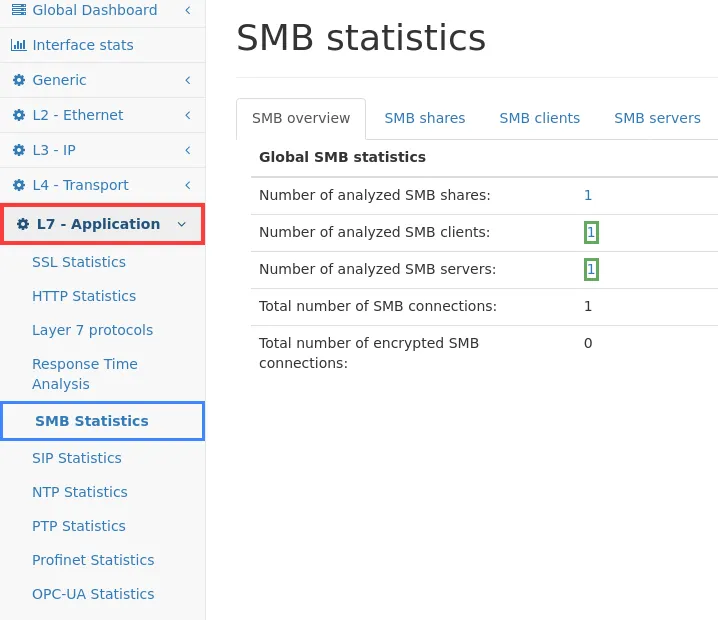
Overview
Section titled “Overview”The SMB overview tab shows global statistics about how many shares, clients, servers, and connections are available in the corresponding tabs.
Additionally, the total number of connections processed and the number of encrypted connections is shown. These numbers might be higher than the number of analysed connections, since old and inactive connections may be removed when the internal memory is full.
Shares
Section titled “Shares”The SMB shares tab shows all SMB servers which have been seen to handle unencrypted SMB traffic. The table shows the server IP, known alternative names for the IP, and SMB share name. The number of successful and failed connects to the share are shown as well as the number of disconnects.
After clicking a specific share, the files on that share are shown.
Files on share
Section titled “Files on share”A table of all files accessed on this share is shown. The list can be filtered for specific file names.
The shown information include the time when the file has been opened for reading or writing the first time and the latest time. The time when the file has been closed last is shown too. The last delete time is the time when the file has been deleted (successfully or unsuccessfully).
The number of file opens, file closes, and file deletes is shown both for successful and failed operations.
The number of bytes read and written per file is also shown. This is the number requested by the client, it does not cover retransmissions and overall overhead, just plain file bytes.
Clients
Section titled “Clients”The SMB clients tab shows all SMB clients seen on the network and all SMB dialects they claim to support. The actual used SMB dialects are shown as well. Also, the number of encrypted flows is shown. Additional counters are shown indicating the number of failed SMB operations.
Clicking the IP opens the generic IP details of the corresponding SMB client. The Go to column allows to jump to SMB connection details for this client.
Client connection details
Section titled “Client connection details”The Client connection view shows information about individual SMB connections of the selected SMB client.
The table contains information about the SMB negotiation state, indicating which dialects have been requested by the client and which dialect has been actually used for the connection. This is especially helpful if some clients show connection problems to specific SMB servers. Additional counters are shown, indicating the number of failed SMB operations.
Servers
Section titled “Servers”The SMB servers tab shows all SMB servers seen on the network and their corresponding SMB dialect they are operating. Also, the number of encrypted flows is shown.