
VLAN module
VLAN Statistics
Section titled “VLAN Statistics”The VLAN statistics shows information about all seen VLANs. IEEE 802.1Q VLAN and IEEE 802.1ad Q-in-Q are supported. The module displays traffic counters for each VLAN seen on the network. Additionally, statistics about traffic without any VLAN tag is always shown.
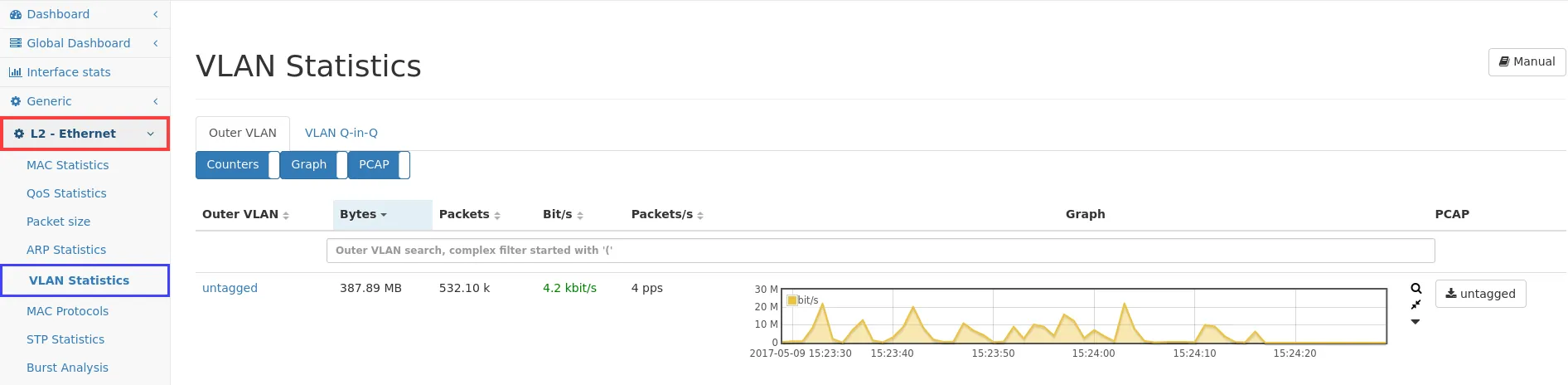
Outer VLAN
Section titled “Outer VLAN”This tab shows statistics about VLANs and traffic outside of any VLAN. The displayed outer VLAN tag is the IEEE 802.1Q VLAN tag. In the context of IEEE 802.1ad Q-in-Q it is the one closest to the Ethernet header, sometimes also known as S-TAG (Service tag). The statistics include the total amount of bytes and packets for that particular VLAN as well as the current throughput. A history graph is available to show bytes and packets counters changed over time. As usual, the resolution can be changed using the top buttons to any interval. It is also possible to capture traffic for a specific VLAN tag by clicking on the corresponding button in the last column.
VLAN Q-in-Q
Section titled “VLAN Q-in-Q”This tab shows statistics about IEEE 802.1ad Q-in-Q VLANs. The displayed outer VLAN tag is the one closest to the Ethernet header, sometimes also known as S-TAG (Service tag). The inner VLAN tag is the one closest to the payload of the Ethernet frame, sometimes also known as C-TAG (Customer tag). The Allegro Network Multimeter supports two stacked VLAN tags. The statistics include the total amount of bytes and packets for that particular inner VLAN tag as well as the current throughput. A history graph shows bytes and packets counters changed over time. To capture traffic for a specific inner VLAN tag, a PCAP button is available.